Message Extraction
Message extraction is a key part of the internationalization process. It involves scanning your codebase to identify and extract all the defined messages, ensuring that your message catalogs stay synchronized with the source code.
In practice, developers define messages directly in the source code, and the extraction tool automatically collects these messages and stores them in a message catalog for translation.
Read more about the lingui extract command.
Supported Patterns
The extractor operates at a static level, meaning that it analyzes the source code without executing it. As a result, it doesn't support complex patterns or dynamic code, and only simple, statically defined messages are collected.
Macros Usage
Macros are JavaScript transformers that run at build time. The value returned by a macro is inlined into the bundle instead of the original function call.
The Lingui Macro provides powerful macros to transform JavaScript objects and JSX elements into ICU MessageFormat messages at compile time.
Extractor supports all macro usage, such as the following examples:
import { t } from "@lingui/core/macro";
import { Trans } from "@lingui/react/macro";

t`Message`;

t({
  id: "custom.id",
  message: "Message with custom ID",
});

const jsx = <Trans>Hi, my name is {name}</Trans>;
The extractor matches the t and Trans macro calls and extracts the messages from them.
For more usage examples, see to the Macros reference.
Non-Macros Usage
Non-macro use is also supported, but it's not common. It's recommended to use macros.
The extractor matches i18n._ or i18n.t function calls. It also matches when these functions are called from other member expressions, such as ctx.i18n.t().
The extractor only matches calls by name. It doesn't check if they are really imported from Lingui packages.
For example:
i18n.t("message.id");
i18n.t({ id: "message.id" });

ctx.i18n._("message.id");
ctx.i18n.t("message.id");

ctx.request.i18n.t("message.id");

// and so on
To ignore a specific call expression during extraction, you can add a lingui-extract-ignore comment:
/* lingui-extract-ignore */
ctx.i18n.t("Message");
Messages marked with this comment will be excluded from extraction.
lingui-set Comment Directive
You can use the lingui-set comment directive to set context and/or comment for subsequent macro calls without passing them to every call:
import { t } from "@lingui/core/macro";

// lingui-set context="settings" comment="Settings page"
const msg1 = t`Save`;
const msg2 = t`Cancel`;
Both messages will be extracted with context="settings" and comment="Settings page". The directive values persist for all subsequent macros until overridden by another directive or cleared with lingui-reset.
See lingui-set Comment Directive in the Macros reference for full details and examples.
Explicitly Marking Messages
In addition to call expressions, which are the most commonly used method, the extractor tool also supports simple string literals and message descriptors with explicit annotations.
To do this, simply prefix your expression with the /** i18n */ or ( /* i18n */, both variants are supported) comment, like so:
const messageDescriptor: MessageDescriptor = /** i18n */ { id: "Description", comment: "description" };
const stringLiteral = /** i18n */ "Message";
Unsupported Patterns
The extractor is limited to extracting messages from code that is written a certain way. It cannot extract messages from variables or function calls. It also cannot follow the program structure and get the value of a variable defined elsewhere.
This means that in order for a message to be extracted, it must be defined directly in the function call:
// ❌ This message will not be extracted
const message = "Message";
i18n.t(message);

// ✅ This message will be extracted
i18n.t("Message");
Defining Sources for Analyzing
The extractor can locate source files in two ways: by specifying a glob pattern or by crawling the dependency tree.
Glob Pattern
By default, lingui extract uses a glob pattern to search for source files containing messages.
The pattern is defined in the catalogs property of the Lingui configuration file in your project's root directory.
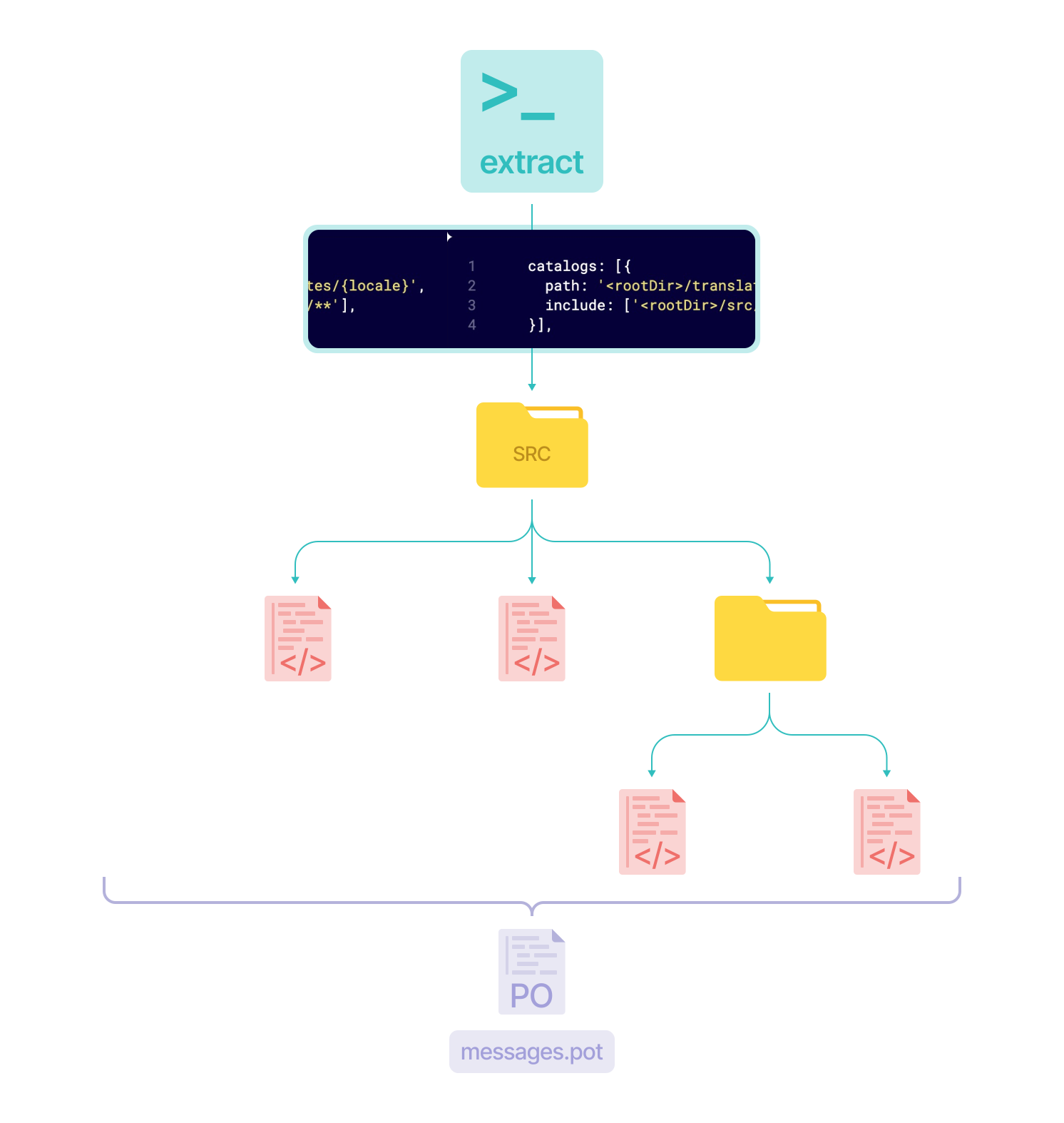
Dependency Tree Crawling
While the glob-based extraction process works well for most projects, it can be challenging for multi-page applications (MPAs) such as Next.js. In such cases, the glob approach generates a single catalog that includes all messages from each page, which may not be ideal for effectively managing translations.
This means that the entire catalog must be loaded for each page or navigation, resulting in unnecessary loading of messages that aren't utilized on that specific page.
To address this issue, an experimental-extractor has been introduced in Lingui v4.
This is an experimental feature. Experimental features are not covered by semver and may be subject to change.
This extractor uses the dependency tree of files, rather than just a glob pattern, to crawl imports and discover files more accurately.
By doing so, it creates a more optimized catalog that only contains the messages needed for each page.
The catalogs would still contain duplicate messages for common components, but it would be much better than the current approach.
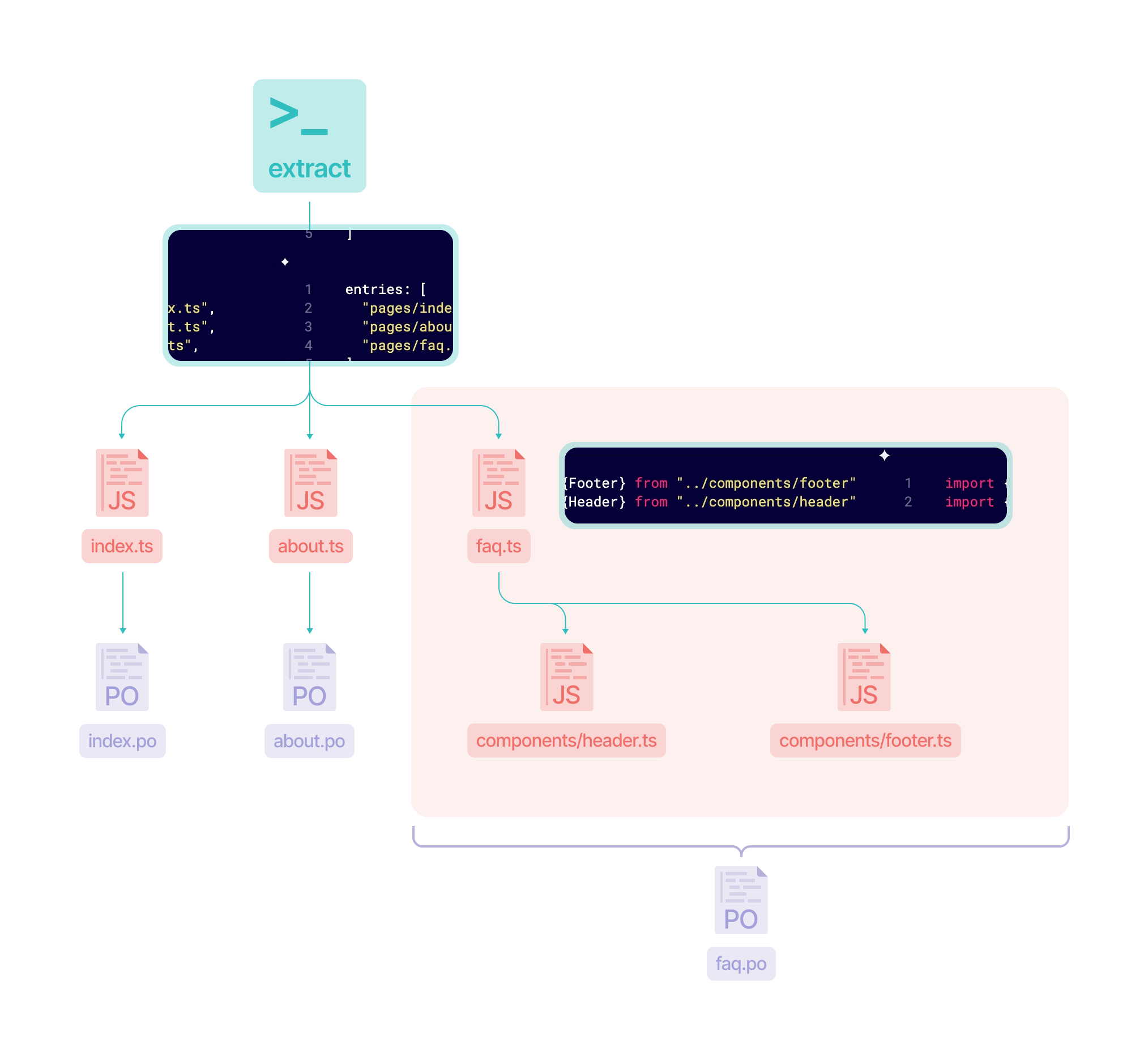
To start using experimental-extractor, add the following section to your Lingui configuration:
/**
 *
 * @type {import('@lingui/conf').LinguiConfig}
 */
module.exports = {
  // remove everethying from `catalogs` property
  catalogs: [],
  experimental: {
    extractor: {
      // glob pattern of entrypoints
      // this will find all nextjs pages
      entries: ["<rootDir>/src/pages/**/*.tsx"],
      // output pattern, this instruct extractor where to store catalogs
      // src/pages/faq.tsx -> src/pages/locales/faq/en.po
      output: "<rootDir>/{entryDir}/locales/{entryName}/{locale}",
    },
  },
};
Then run the following command in your terminal:
lingui extract-experimental
Configuring the Bundler
The experimental extractor uses a bundler under the hood to resolve dependencies and apply tree-shaking. By default, it uses esbuild, but you can configure it to use rolldown or implement your own bundler integration.
Rolldown
If your project uses Vite-based tooling, rolldown is the recommended choice. Vite is powered by rolldown (or rollup), so the extraction results will more closely match what Vite produces in your actual builds. You can even reuse parts of your Vite configuration.
Rolldown also has more powerful tree-shaking capabilities, which results in smaller and more accurate catalogs compared to esbuild. By default, the rolldown bundler uses the standard tree-shaking preset, but you can experiment with the smallest preset for even more aggressive dead code elimination. Since the bundler is only used for message extraction (not producing runtime code), the typical side-effect concerns around aggressive tree-shaking don't apply in most cases.
npm install --save-dev rolldown @rolldown/plugin-babel
import { defineConfig } from "@lingui/conf";
import { createRolldownBundler } from "@lingui/cli/bundlers/rolldown";

export default defineConfig({
  locales: ["en", "fr"],
  catalogs: [],
  experimental: {
    extractor: {
      entries: ["<rootDir>/src/pages/**/*.tsx"],
      output: "<rootDir>/{entryDir}/locales/{entryName}/{locale}",
      bundler: createRolldownBundler(),
    },
  },
});
To use the smallest tree-shaking preset:
import { createRolldownBundler } from "@lingui/cli/bundlers/rolldown";

createRolldownBundler({
  resolveRolldownOptions: (options) => ({
    ...options,
    treeshake: "smallest",
  }),
});
esbuild
esbuild is the default bundler and doesn't require any additional configuration. You can also configure it explicitly if you need to customize its behavior:
npm install --save-dev esbuild
import { defineConfig } from "@lingui/conf";
import { createEsbuildBundler } from "@lingui/cli/bundlers/esbuild";

export default defineConfig({
  locales: ["en", "fr"],
  catalogs: [],
  experimental: {
    extractor: {
      entries: ["<rootDir>/src/pages/**/*.tsx"],
      output: "<rootDir>/{entryDir}/locales/{entryName}/{locale}",
      bundler: createEsbuildBundler({
        includeDeps: ["@my-company/shared"],
      }),
    },
  },
});
Custom Bundler
You can implement your own bundler by conforming to the ExperimentalExtractorBundler interface:
Your bundler implementation must:
- Apply the Lingui macro transform to each file during bundling, not after. The macro transform is designed to work on authored source code — once files are bundled together, the transform will not work correctly.
- Produce inline sourcemaps in the output files. The extractor uses sourcemaps to map messages back to their original file and line number — without them, catalog origins (
#:references) will point to the bundled output instead of the source.
See the built-in esbuild and rolldown bundlers for reference on how to integrate the transform as a bundler plugin.
import { defineConfig } from "@lingui/conf";
import type { ExperimentalExtractorBundler, BundleChunk } from "@lingui/conf";

const myBundler: ExperimentalExtractorBundler = {
  async bundle(entryPoints, outDir, linguiConfig) {
    // Your bundling logic here.
    // Must apply @lingui/babel-plugin-lingui-macro or @lingui/swc-plugin during the transform phase.

    // Return a chunk graph — the CLI traverses it to determine
    // which entry points depend on each shared chunk.
    const chunks: BundleChunk[] = [
      {
        id: "about.page.jsx",
        filePath: `${outDir}/about.page.jsx`,
        entryPoint: "/abs/path/to/src/pages/about.page.tsx",
        imports: ["shared-chunk.jsx"],
      },
      {
        id: "shared-chunk.jsx",
        filePath: `${outDir}/shared-chunk.jsx`,
        // no entryPoint — this is a shared chunk
        imports: [],
      },
    ];

    return { chunks };
  },
};

export default defineConfig({
  experimental: {
    extractor: {
      entries: ["<rootDir>/src/pages/**/*.tsx"],
      output: "<rootDir>/{entryDir}/locales/{entryName}/{locale}",
      bundler: myBundler,
    },
  },
});
Bundler Options Reference
Both createEsbuildBundler and createRolldownBundler accept the following common options:
| Option | Description |
|---|---|
includeDeps | Package names to bundle instead of marking as external. Use this for internal packages that contain messages |
excludeExtensions | File extensions to externalize (e.g., .css, .svg). Has sensible defaults |
Additionally, each bundler accepts a resolver function for full control over bundler-specific options:
createEsbuildBundler({ resolveEsbuildOptions: (opts) => opts })createRolldownBundler({ resolveRolldownOptions: (opts) => opts })
Important Notes
It's worth noting that the accuracy of the catalog depends heavily on tree-shaking, a technique used by modern bundlers to remove unused code from the final bundle.
If the code passed to the extractor is written in a tree-shakeable way, the user will get highly accurate catalogs.
While you may think that your code is tree-shakeable, in practice tree-shaking may work differently than you expect, and some unwanted strings may be included in the catalogs.
To illustrate, let's consider the following code:
import { msg } from "@lingui/core/macro";

export const species = {
  Cardano: [
    {
      startsAt: 0,
      name: msg`Ghost`,
      icon: "Ghost",
    },
    {
      startsAt: 0.000001,
      name: msg`Plankton`,
      icon: "Plankton",
    },
  ],
};
On the surface, it may appear that this code can be safely removed from the final bundle if it isn't used. However, the msg function call may have a side effect that prevents the bundler from removing the entire species object from the final bundle. As a result, messages defined in this snippet may be included in more catalogs than expected.
To avoid this issue, one solution is to wrap the species object inside an Immediately Invoked Function Expression (IIFE) and add the /* @__PURE__ */ annotation.
By adding this annotation to the IIFE, we tell the bundler that the entire species object can be safely removed if it is not used or exported elsewhere in the code.
Supported Source Types
The extractor supports TypeScript, Flow, and JavaScript (Stage 3) out of the box.
If you are using some experimental features (Stage 0 - Stage 2) or frameworks with custom syntax such as Vue.js or Svelte, you may want to implement your own custom extractor.
Visit Custom Extractor to learn how to create a custom extractor.